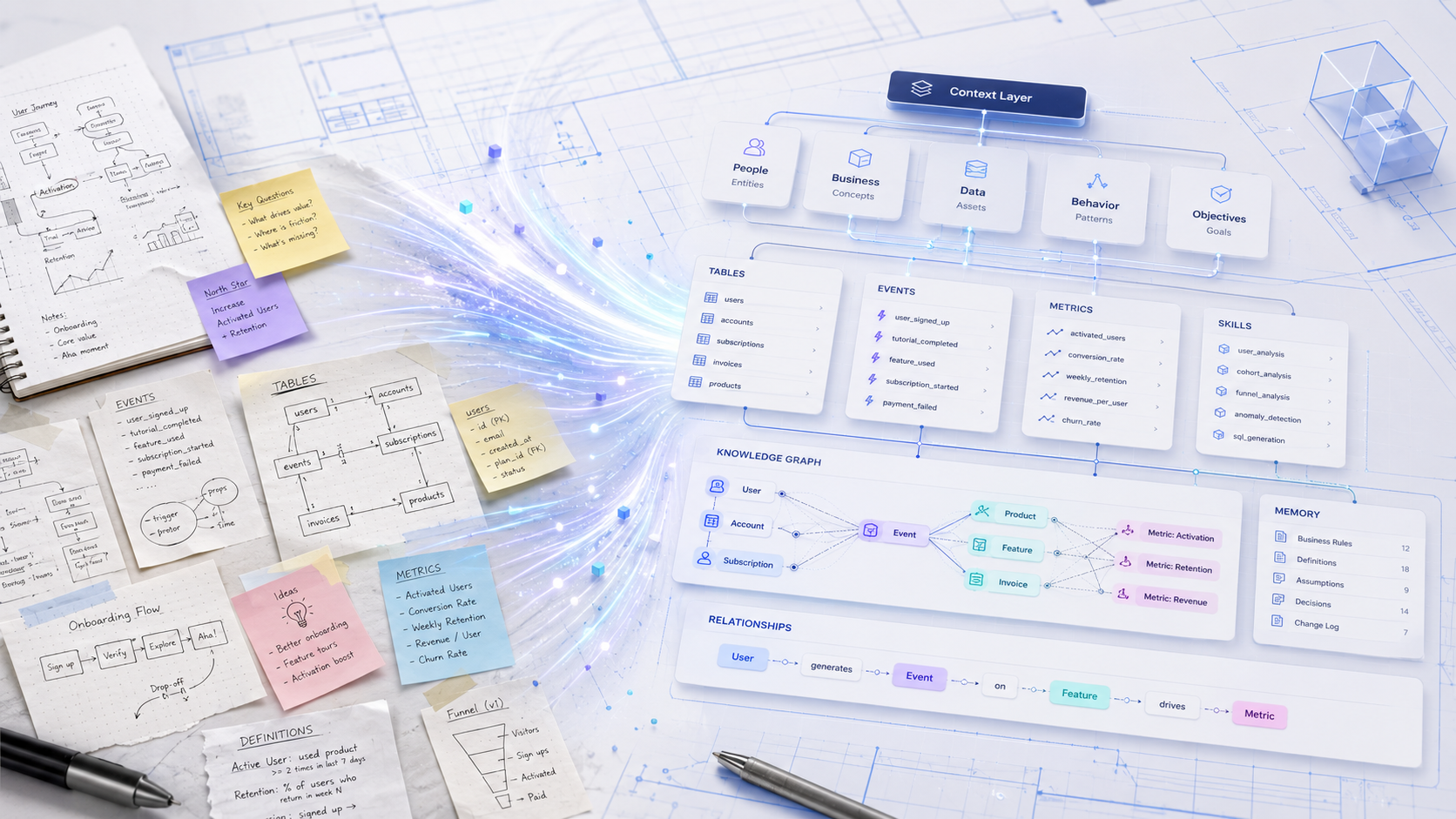
A context layer for AI is the set of descriptions and definitions that tell an AI what your data actually means. Building and maintaining a great context layer - the descriptions and definitions that tell an AI what your data actually means - is the difference between trustworthy AI data analytics and one you can't.
The AI era has settled the why of context layers - the case for needing one is well-made and widely written about. The how, especially how you maintain one as your business, your data, and your team evolve, has gotten far less attention. This post is about Context Builder, our new release that turns that maintenance work into a conversation with an agent - safely and gradually, with drafts and diffs at every step.
Our Context Layer is how ClarityQ, an AI data analytics platform, turns raw warehouse data into answers anyone can trust. It has five parts:
What sets it apart from the semantic layers you've seen elsewhere: it's purely descriptive. We don't move, copy, or transform your data - the context layer describes the warehouse you already have, exactly as it is. That means we run with read-only access to your warehouse, no write permissions or shadow tables required. It also means everything in the context layer is something an analyst can read, point at, and explain. And as of this release, it's something they can build by talking.Context layer vs. semantic layer: unlike a traditional semantic layer that models and transforms data into new tables, the context layer is purely descriptive - read-only over the warehouse you already have, with no copies or shadow tables to maintain.
Anyone who has lived with a context layer knows what that maintenance looks like in practice. You stare at a "New Metric" form. You wonder whether someone already shipped this metric three months ago under a different name. You hand-write SQL. You hit save, and you've just changed something every dashboard in the company depends on.
We rebuilt that experience from the ground up.
For as long as analytics platforms have had semantic layers, editing them has looked the same way: forms in an admin UI, hand-written YAML or SQL in a config repo, pull requests if you're lucky, and a sinking feeling whenever you change a definition that something downstream depends on. The work demands SQL fluency, schema fluency, and patience.
Context Builder treats the same work as a conversation with a team of BI specialists, with safety rails built in.
Describe what you want - a new metric, a rename, an entity or a skill you noticed missing - and a builder agent does it. There's a specialist for each part of the context layer: one for metrics, one for segments, one for entities and dimensions, one for skills. Each one knows the conventions of its domain, searches for duplicates before creating anything, and explains the impact before changing or deleting.
Drop in a CSV, a spreadsheet, a methodology doc, or a JSON dump. The agent reads it, validates it, and turns it into context-layer components - metrics from a spec sheet, skills from a methodology page, dimensions from a glossary. Hours of re-typing become a single conversation.
Before any change is published, Context Builder offers three layers of validation.
1. Audit. The most innovative part of Context Builder is what we call the "Audit" - or, around the office, "the doctor." A dedicated agent reads the entire context layer and surfaces what static tools can't see: metrics that should be the same but were defined slightly differently, segments whose logic contradicts another's, references that no longer resolve, inconsistencies in style across components. Each finding is color-coded by severity, with a one-click path back into Builder to fix it.
2. Try it before you ship. Once you've defined the new context component, the next step is to actually try it out before affecting the entire company. This is an essential part of the process: work with the conversational agent, ask questions whose answers utilize the new component, and make sure the answers are accurate and as expected. For more significant changes, you can run an evaluation suite against your draft - a set of benchmark questions whose answers depend on the context layer - to catch regressions before deploy.
3. Approval (the PR equivalent). Builder treats catalog changes like code: drafts work like feature branches, diffs like code review, approval like merging to main, and rollback like a revert. Every change lands in a draft - a working copy of the context layer only you see while editing. You review a diff and approve each step. Past versions are preserved as snapshots, so rolling back or comparing to any earlier version is one click.
Editing a context layer used to require fluency that took months to build: SQL dialects, schema layouts, modeling conventions, deploy pipelines. Builder collapses that into a conversation, with safety guarantees stronger than most teams have today even with full engineering review.
Behind the conversational surface is a system designed around three commitments: where the agent works, how its output becomes catalog state, and how every change leaves a permanent record.
Every builder session spins up its own sandbox - an ephemeral container with a real filesystem. The agent doesn't call a dedicated "create metric" function; it writes, reads, and edits files like a developer would. When you upload a CSV, it lands in the same filesystem and the agent picks it up the same way - which is why bulk import from documents feels seamless rather than like a separate flow.
Inside that sandbox isn't one AI; it's a small team. An orchestrator dispatches to specialized sub-agents - one for each part of the context layer, plus a dedicated auditor - each with its own prompt, its own tools, and its own narrow scope. We can sharpen any one specialist without touching the others.
The tools that mutate the catalog can't commit on their own. They emit an approval card and stop. We treat human-in-the-loop as a structural guarantee, not a behavior we hope the model maintains.
Context-layer state lives in two parallel worlds - one published, one draft - with one editor at a time. While you edit, your own queries see your draft; everyone else sees production. You can test changes exactly as they'll look post-deploy, with zero risk that someone downstream catches an in-progress edit. Deploying takes a snapshot of the current state, promotes the draft to published, and releases the lock, all in one step. Rolling back to any earlier version is one click, and history is never destructive: rollback creates a new version with the old contents rather than erasing forward history.
Every conversation is a persistent tree of messages, tool invocations, and tool results - not a stateless chat. When a question turns into a fix, the relevant branch carries forward into a builder session and the agent picks up with the full history already in context. That's why "fix that metric" works without you re-explaining which metric you mean.
Skills, product memory, conversations, and the audit log itself are all versioned the same way as the semantic catalog. Every consequential change writes a row, with the old value and the new value preserved.
A few principles run through all of it.
Agentic where it helps, programmatic where it's safer. Adding dimensions is programmatic - the agent shows you a selection UI and the writes go through a regular API. SQL generation, duplicate detection, impact analysis, methodology-doc-to-skill: that's where an agent earns its keep.
One source of truth at every layer. One lock per product. One active chat per draft. One representation of a tool invocation surfaced in the UI, the audit log, and Slack alike. When we found ourselves keeping the same state in two columns, we collapsed it.
Advisory, not blocking. Audit warns. Test reports. Neither stops you from deploying. The system is built to give analysts information, not refuse them.
Versioned everything, snapshotted everything. Semantic catalog, skills, product memory - they all carry versions, and every change writes an audit row with the old value, the new value, and exactly which fields moved.
The Context Builder already turns months of manual data modeling into an automated, reviewable process - but we're just getting started. Our roadmap takes the Builder from reacting to changes, to learning from usage, to anticipating what your business needs next.
The vision is a Context Layer that requires less from your team at every step - until it understands your business so deeply that it improves itself before you even think to ask. In short, Context Builder makes maintaining a context layer for AI as simple as a conversation - the foundation for trustworthy AI data analytics.